 Low End Box 最近发布了一篇题为《新手快速了解 Udemy 的两门免费课程》的文章!文中讨论的两门 Udemy 课程中的第二门是《使用 PHP、MySQL 和 AJAX 创建会员专属博客》。
上一篇文章提到,Udemy 会员专属博客课程的先决条件是已安装LAMP 环境。许多人喜欢在本地开发机器上运行 LAMP 或其他环境。然而,也有许多人更喜欢在云端工作。
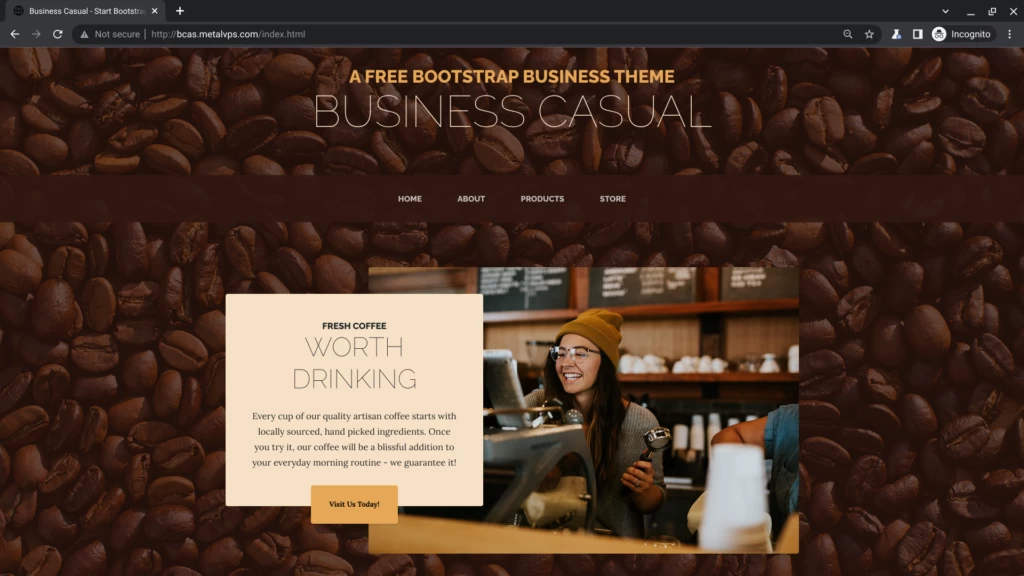
这门 Udemy 课程基于名为 Business Casual 的Bootstrap主题。Business Casual 主题源自StartBootstrap 项目。StartBootstrap的 Business Casual 主题当前版本已在 GitHub 上发布,并采用 MIT 许可证。
正如我们在之前的 Udemy 课程文章中提到的,这门课程已经制作完成几年了。我们能否更新一下这门课程?我们能否搭建一个新的、最新的 LAMP 环境,然后从 GitHub 安装最新版本的 Business Casual?
让我们给自己布置个作业吧!我们来尝试在Oracle 云免费套餐的Ubuntu 实例上安装最新的 LAMP 和 Business Casual 系统。再次感谢 Oracle 提供如此便捷的免费账户,让我们很多人都能享受到这些服务!
LAMP教程
网上有很多关于 LAMP 安装的教程。我浏览了不少,其中两个特别有用:
- 如何在 Ubuntu 22.04 上安装 Linux、Apache、MySQL、PHP (LAMP) 架构
- 如何在 Ubuntu 22.04 上使用 Let's Encrypt 保护 Apache 服务器
更简便的灯具安装?
GitHub 上有Teddysun 的 LAMP 安装脚本。简单浏览了一下,感觉这个脚本相当不错!它已经获得了 2.6K 个 star。
家庭作业步骤和结果
以下列出了尝试安装 LAMP 和 Business Casual 时使用的命令步骤。此外,还提供了命令及其输出的逐行编号记录。
该过程部分成功,LAMP 和 Business Casual 都已安装,并且 Apache 也已成功通过 HTTP 协议提供 Business Casual 服务。已知问题包括:至少未为配置的子域名颁发 Let's Encrypt 证书,以及未能设置 MySQL 密码。随着我们继续学习 Udemy 课程,或许能找到解决这两个安装问题的办法。
更新和升级 Ubuntu
$ sudo apt update
 $ sudo apt upgrade
 $ sudo reboot # Just to be sure it can reboot.
安装 Apache 和防火墙设置
$ sudo apt install apache2
 $ sudo ufw app list
 $ sudo ufw allow in "Apache"
 $ sudo ufw status
 Status: inactive
 $ sudo ufw allow in "OpenSSH"
 $ sudo ufw enable
 $ sudo ufw status
 Status: active
采取行动
——
Apache 允许任何位置
OpenSSH 允许任何位置
Apache (v6) 允许任何位置 (v6)
OpenSSH (v6) 允许任何位置 (v6)
$ curl $(curl icanhazip.com) # 从本地机器访问 http://$Server_IP # 失败了。为什么?
$ sudo 重启
$ curl $(icanhazip.com) # 从本地机器访问 http://$Server_IP # 重启后可以正常工作。为什么?
安装 MySQL
$ sudo apt install mysql-server
 $ sudo mysql_secure_installation # MySQL root password doesn't work
安装 PHP
sudo apt install php libapache2-mod-php php-mysql
 $ php -v
 $ sudo mkdir /var/www/bcas.metalvps.com
 $ sudo chown ubuntu:ubuntu /var/www/bcas.metalvps.com
 $ cd /etc/apache2/sites-available
 $ ed bcas.metalvps.com # ed editor facilitates making the transcript
 bcas.metalvps.com.conf: No such file or directory
 a
 <VirtualHost>
 ServerName bcas.metalvps.com
 ServerAdmin webmaster@localhost
 DocumentRoot /var/www/bcas.metalvps.com
 ErrorLog ${APACHE_LOG_DIR}/error.log
 CustomLog ${APACHE_LOG_DIR}/access.log combined
 </VirtualHost>
 .
 w
 260
 q
 $ sudo a2ensite bcas.metalvps.com
 $ sudo systemctl reload apache2
 $ sudo apache2ctl configtest
 $ cd /var/www/bcas.metalvps.com/
 $ ed index.html
 index.html: No such file or directory
 a
 <html>
 Hello from bcas.metalvps.com!
 .
 -1
 <html>
 a
 <center>
 .
 w
 46
 q
 $ curl bcas.metalvps.com # Also http://bcas.metalvps.com from Chrome on local machine
 $
安装 Certbot 并获取 Let's Encrypt 证书
$ sudo apt install certbot python3-certbot-apache
 $ sudo ufw allow 'Apache Full'
 $ sudo ufw delete allow 'Apache'
 $ sudo ufw status
 Status: active
采取行动
——
OpenSSH 允许任何位置
Apache 完全允许任何位置
OpenSSH (v6) 允许任何位置 (v6)
Apache Full (v6) 允许任何位置 (v6)
$ sudo certbot –apache # 失败。请查看记录。
安装商务休闲 Bootstrap 主题
$ cd
 $ git clone https://github.com/StartBootstrap/startbootstrap-business-casual.git
 Cloning into 'startbootstrap-business-casual'...
 remote: Enumerating objects: 920, done.
 remote: Counting objects: 100% (273/273), done.
 remote: Compressing objects: 100% (114/114), done.
 remote: Total 920 (delta 141), reused 258 (delta 132), pack-reused 647
 Receiving objects: 100% (920/920), 10.98 MiB | 12.71 MiB/s, done.
 Resolving deltas: 100% (492/492), done.
 $ cd /var/www/bcas.metalvps.com/
 $ mv index.html index-original.html
 $ cp -pr ~/startbootstrap-business-casual/dist/* .
 $ ls
 about.html assets css index-original.html index.html js products.html store.html
 $
在本地笔记本电脑上查看商务休闲主题